
Your Privacy Choices
Information on opting-out of sales, sharing, and targeted advertising
HD Telly engages in online advertising practices (and certain analytics or similar activities) which may be considered a “sale”, “share”, or “targeted advertising” under certain U.S. state laws. You may opt out of “sales”, “sharing”, or “targeted advertising” under those state laws by following the instructions provided below.
For Consumers with a HD Telly Account
Visit your Account Settings to confirm that you’re signed in. Then, click the link labeled “Your Privacy Choices” in the footer at the bottom of that page.

You may opt out by disabling the setting (toggled to the left) on the pop-up screen as shown below.
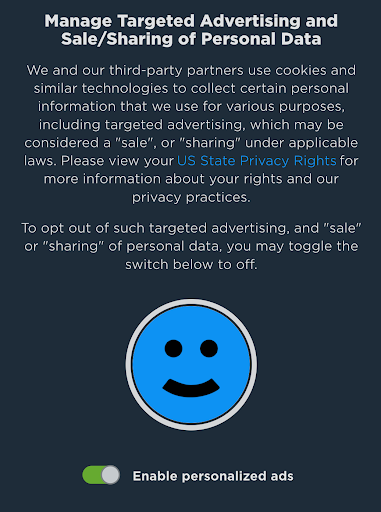
Once disabled, your settings have been updated. If your account has more than one user profile, please note that this setting is managed on a per-profile basis.
For Consumers who do not have a HD Telly Account or are not signed in
On web browsers, you may opt out of cookies set by third parties that may be considered “sales”, “sharing”, or “targeted advertising” under state laws by following this link to our Opt-Out page: https://www.hdtelly.com/do_not_sell. Please note that your opt-out is specific to your device and browser.
For more information, please visit our Privacy Policy and review the U.S. State-Specific Rights section and California Privacy Notice. You can also contact us with any questions at help@hdtelly.com or at hdtelly.com/contact.